DDL 命令
DDL 语句用于创建数据库对象。
1. Table
参数说明
规范 |
描述 |
详情 |
语法 |
|---|---|---|---|
TableName |
表格名称 |
要创建的表的名称,在数据库中必须是唯一的,并遵循命名约定。 |
Table table_name |
副本 |
副本数量 |
设置副本值。 |
Replica = {replica} |
自动增加 |
自增领域 |
字段列可以指定为自递增列,目前只支持 int 类型的字段列,而且可以指定自递增列的起始值。 |
filed field_type auto_increment |
Default |
default_name |
指定表格中某一列的默认值。 |
Default default_name |
Not null |
Not null |
用于确保列中的值不能为空。在 Dingo 中,not null 必须跟在字段末尾。 |
NOT NULL |
主键 |
主键 |
用于唯一标识表中每一行的一列或多列。在 Dingo 中,不能直接在字段后设置主键,需要在单独的一行中设置主键。 |
Priamry Key(field_name) |
Partition by |
范围分区 |
按范围分区;根据指定的范围将数据分成不同的分区。您可以根据一列或多列的值按范围分区。 |
Partition by range values(1,100),(101,200); |
Partition by |
哈希分区 |
按键的哈希值分区;按一列或多列的哈希值分区。每个哈希值决定数据所属的分区。 |
Partition by hash partitions={partitions} |
Engine |
存储引擎 |
创建表格时,可以指定相应的存储引擎;Dingo 提供了两种存储引擎: LSM BTree、Txn_LSM、Txn_BTree: Txn_LSM |
Engine = {engine_name} |
Index |
vector index field |
是指在向量字段上创建索引时,需要在创建索引时指定索引类型为向量。 |
INDEX [index_name] (vector) ({index_parameters}) [WITH ({columns})] (PARAMETERS) (vector_ parameters) |
Index |
标量索引字段 |
是指在标量字段上创建的索引。创建索引时,默认将其指定为标量索引,可以写入或不写入标量。 |
INDEX [index_name] (scalar) ({index_parameters}) [WITH ({columns})] (PARAMETERS) (vector_parameters) |
创建表格
语法
CREATE TABLE [IF NOT EXISTS] table_name
(
    <col_name> <col_type> [ { DEFAULT <expr> }],
    <col_name> <col_type> [ { DEFAULT <expr> }],
    ...
)
用例
dingo> CREATE TABLE test(id Int, name Varchar, address Varchar);

dingo> INSERT INTO test values(1,'xiaoming','shanghai');

dingo> select * from test;
+------+--------+---------+
| ID   | NAME   |ADDRESS  |
+------+--------+---------+
|  1   |xiaoming|shanghai |
+------+--------+---------+
删除表格
语法
DROP TABLE [IF EXISTS] name
用例
dingo> CREATE TABLE test(id INT, name Varchar);
dingo> DROP TABLE test;
2. Index
创建 IndexTable
语法
使用标量索引创建表格
create table demo1 (
    id int,
    name varchar(32),
    age int,
    gmt bigint,
    price float,
    birthday date,
    create_time time,
    update_time timestamp,
    zip_code varchar(20),
    is_delete boolean,
    index name_index (name),
    PRIMARY KEY (id)
);
使用向量索引创建表格
create table demo2
(
    id bigint not null,
    name varchar(32),
    age int,
    amount double,
    birthday date,
    feature float array not null,
    feature_id bigint not null,
    index feature_index vector(feature_id, feature) parameters(type=hnsw, metricType=L2, dimension=8, efConstruction=40, nlinks=32)
    primary key(id)
);
在 SQL 中,feature 列是向量列,类型是浮点数组。使用向量列时需要添加向量索引,否则将被视为普通数组类型,向量索引中的定义与标量索引中使用VECTOR方法的相应定义类似,需要两个参数:一是id列的向量,目前只支持整数类型;二是该列的向量,目前只支持浮点类型。
创建带全文索引的表格
CREATE TABLE test
(
       id bigint not null,
       feature float array not null,
       feature_id bigint not null,
       description varchar not null,
       category varchar not null,
       rating bigint not null,
       text_id bigint not null,
       INDEX text_index TEXT(text_id, description, category, rating, text_id) engine=TXN_BTREE PARTITION BY RANGE values(10) parameters(text_fields='{"description": {"tokenizer": {"type": "stem"}}, "category": {"tokenizer": {"type": "stem"}}, "rating": {"tokenizer": {"type": "i64"}}, "text_id": {"tokenizer": {"type": "i64"}}'), # full-text index
       index feature_index vector(feature_id, feature) parameters(type=hnsw, metricType=L2, dimension=8, efConstruction=40, nlinks=32), # vector index
       primary key(id)
) engine=TXN_LSM;
text_id是必填项,全文索引唯一标识ID,ID>0,text_id可以是feature_id,也就是如果是INT64类型即可,如果要对text_id进行索引,需要在TEXT()中添加一个同名参数。description、category、rating是全文索引的字段,只允许使用 4 种类型: 全文本索引的字段至少应包括两个字段,其中一个字段必须是 text_id。注意: text_fields中的parameters是用户填写有关全文索引字段的分词器参数,必须是全文索引字段被填写。
删除表格
删除表格。
语法
DROP TABLE [IF EXISTS] name
用例
dingo> CREATE TABLE test(id INT, name Varchar);
dingo> DROP TABLE test;
3. Partition
Hash
语法
[ PARTITION BY
  HASH
  PARTITIONS={partitions} ]
用例
PARTITION BY HASH PARTITIONS=10,
表示分区的数量;
创建哈希分区表
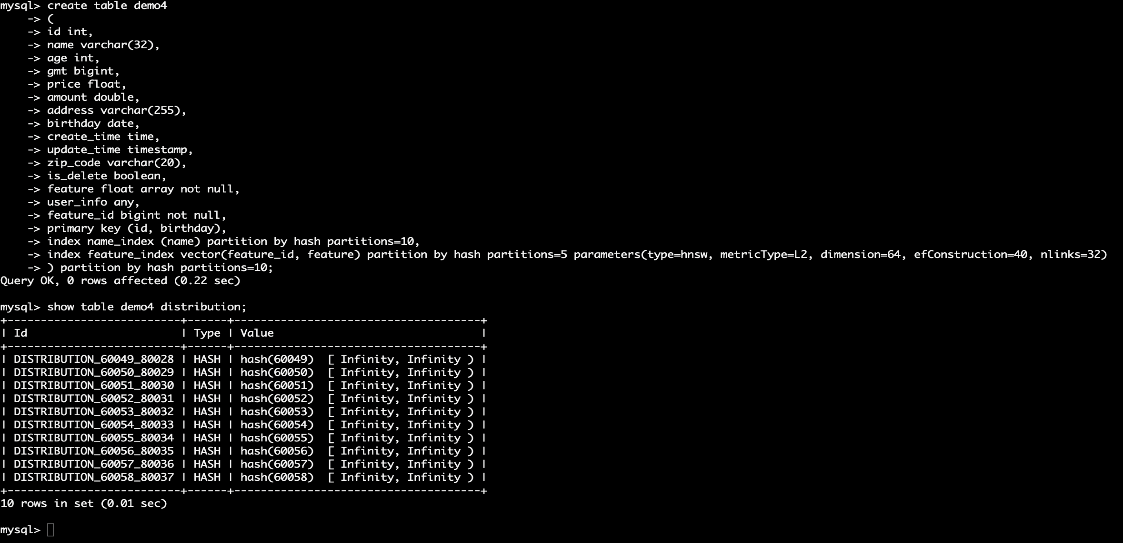
创建哈希分区表,支持 标量索引分区 + 向量索引分区 + 表分区
create table demo4
(
id int,
name varchar(32),
age int,
gmt bigint,
price float,
amount double,
address varchar(255),
birthday date,
create_time time,
update_time timestamp,
zip_code varchar(20),
is_delete boolean,
feature float array not null,
user_info any,
feature_id bigint not null,
primary key (id, birthday),
index name_index (name) partition by hash partitions=10,
index feature_index vector(feature_id, feature) partition by hash partitions=5 parameters(type=hnsw, metricType=L2, dimension=64, efConstruction=40, nlinks=32)
) partition by hash partitions=10;
查看分区信息
show table demo4 distribution;
Range
语法
[ PARTITION BY
  RANGE
  VALUES(( {partition_values} )*) )]
用例
PARTITION BY RANGE VALUES (1,100),(2,100);
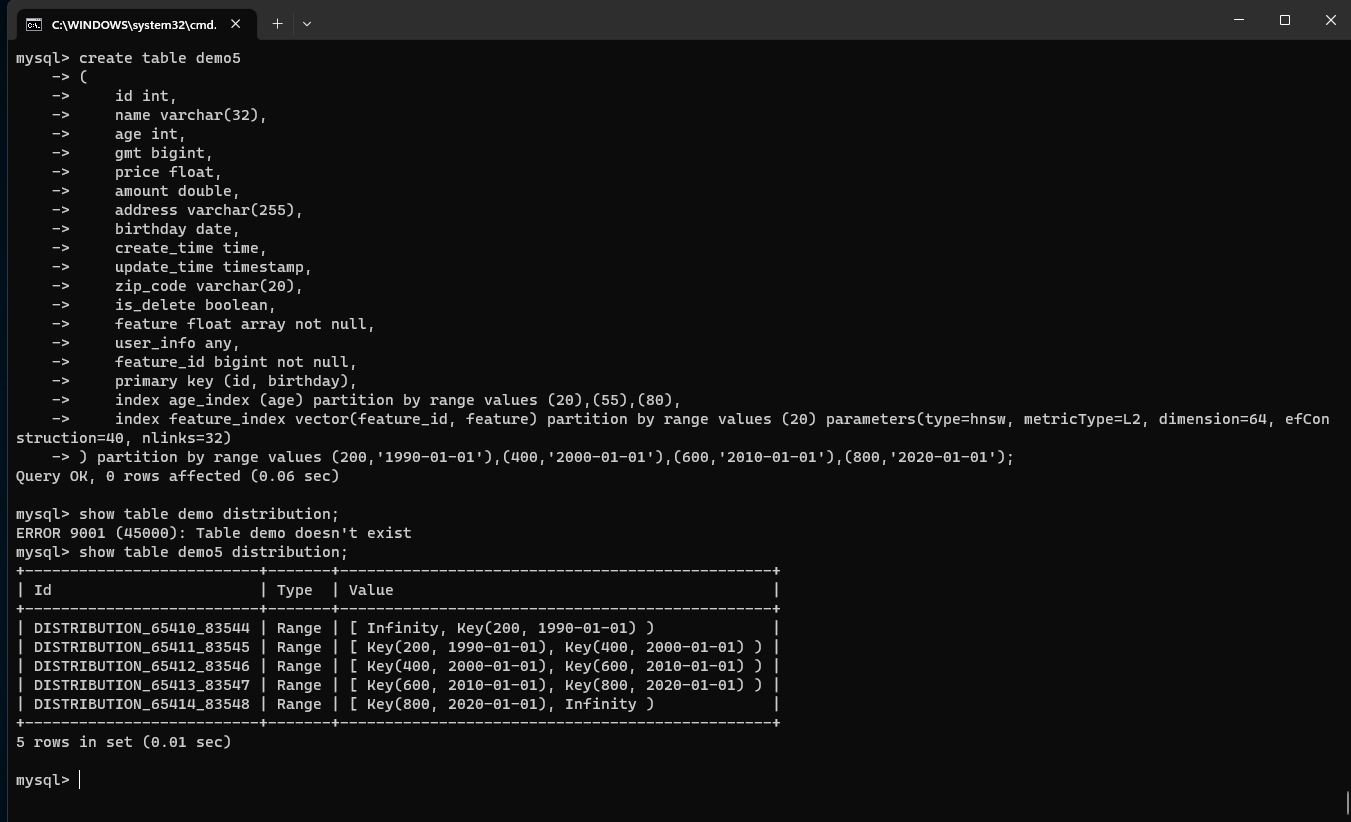
VALUES "后面的值表示将有三个分区;分区范围如下:
[Infinity, key(1,100));
[key(1,100), key(2,100));
[key(2,100), Infinity);
Infinity(无限)表示无限大;在左边是指无限小,在右边是指无限大。
创建范围分区表
创建范围分区表,支持 "标量索引分区 + 向量索引分区 + 表分区
create table demo5
(
    id int,
    name varchar(32),
    age int,
    gmt bigint,
    price float,
    amount double,
    address varchar(255),
    birthday date,
    create_time time,
    update_time timestamp,
    zip_code varchar(20),
    is_delete boolean,
    feature float array not null,
    user_info any,
    feature_id bigint not null,
    primary key (id, birthday),
    index age_index (age) partition by range values (20),(55),(80),
    index feature_index vector(feature_id, feature) partition by range values (20) parameters(type=hnsw, metricType=L2, dimension=64, efConstruction=40, nlinks=32)
) partition by range values (200,'1990-01-01'),(400,'2000-01-01'),(600,'2010-01-01'),(800,'2020-01-01');
查看分区信息
show table demo5 distribution;
4. Region
Region Split
参数 描述
规范 |
详情 |
|---|---|
table_name |
表格名称 |
用例
Alter table tableName add distribution by values(10);
5. Online Schema Change
添加索引
标量指数
alter table t7 add index name_index(name,age,price);
向量索引
alter table t7 add index feature_index vector(feature_id,feature) engine=tnx_lsm parameters(type=hnsw,metricType=L2,dimension=32);
全文索引
alter table t7 add index TEXT_INDEX(`doc_id`,`doc`) with(name,age,feature) parameters(text_fields='{"doc":{"tokenizer":{"type":"default"}}}');
添加带有覆盖索引字段的索引
alter table t7 add index feature_index vector(feature_id,feature) with(name,price) parameters(type=hnsw,metricType=L2,dimension=32);
为指定副本数量和存储引擎添加索引支持
alter table t7 add index feature_index vector(feature_id,feature) with(name,price) parameters(type=hnsw,metricType=L2,dimension=32) ENGINE=TXN_BTREE REPLICA=2;
添加标量索引以支持唯一性约束
alter table t7 add unique index name_index(name,age,price);
删除索引
语法 1
alter table t7 drop index name_index;
语法 2
drop index name_index on t7;
添加列
目前仅支持添加单列
添加指定列
alter table t3 add column price float;
添加列时指定默认值
alter table t3 add column age int default 88;
添加列时指定非空
alter table t3 add column age2 int NOT NULL;
删除列
alter table t3 drop column name;